VectorVest Stock Advisory
VectorVest, Inc.Finance
4.5626.00 Reviews
- Version
- 1.33.72301
- Installs
- 500.00K
- Age Rating
- Everyone
Screenshots
Our Review of VectorVest Stock Advisory
 Analysis by Appyee
I approach stock apps with one practical question: after opening one, can I make a clearer next move, or have I simply collected more numbers? VectorVest Stock Advisory is built around analysis and market context, so it is most useful when you want to examine a stock before acting rather than chase a quick tip. I would treat it as a research companion, not a substitute for deciding what risk you can afford.
What to expect from a stock-focused app
This is a finance app from VectorVest, Inc., aimed at people who want to study individual stocks alongside the broader market. Its central appeal is the effort to turn several kinds of analysis into signals that are easier to interpret. The service has a 4.5 average from around 2.6 thousand ratings, and more than 100 thousand installs; that gives a new user some context about its reach, but popularity alone is not a reason to follow a signal.
Compared with a basic brokerage app, which usually puts account balances, orders, and quotes first, VectorVest places more emphasis on research and interpretation. Compared with a general financial-news app, it is less about reading a stream of headlines and more about examining ratings and market direction. That distinction matters: if all you need is a place to check a price or place a trade, your broker may be simpler. If you want a structured second opinion while building a watchlist, this approach is more relevant.
I would not expect the app to make investing effortless. The useful work still belongs to you: checking why a stock interests you, considering how it fits your goals, and deciding whether an analytical reading matches your own risk tolerance. The app can help organize that process, but a rating is not a guarantee and should not be mistaken for a promise about what a share price will do.
Your Personal Stock Market Guide
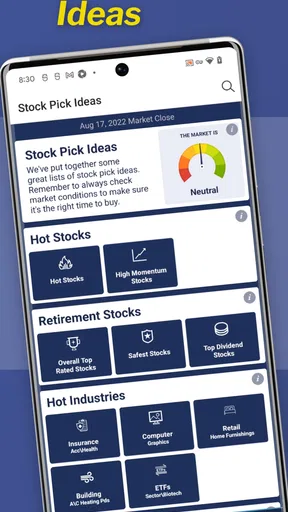
First things first, when you fire up VectorVest Stock Advisory, you're greeted with a clean and intuitive interface. It's kind of like having a friendly financial expert right in your pocket. The app provides a comprehensive overview of market trends and individual stock performances, which is super helpful if you're trying to navigate the stock market's ups and downs.
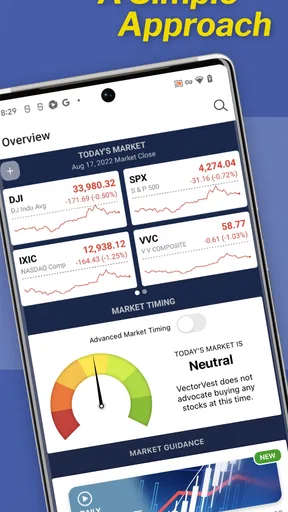
The dashboard is neatly organized with sections that break down the stock market into bite-sized chunks. You'll find an overall market summary, top gainers and losers, and even a quick glance at major indices. It's like having a stock market cheat sheet at your fingertips. The app really goes the extra mile in making sure you’re well-informed before making any investment decisions.
Starting with a manageable routine
For a first-time user, I would resist the temptation to explore every panel immediately. Start with one company you already recognize and use the market summary to set the scene. Then look at that stock’s analysis and write down, in your own words, what you think the app is indicating. This small habit turns the first session into a learning exercise instead of a hunt for a buy button.
A realistic routine might be checking the broader market before work, reviewing a short watchlist at lunch, and returning to any name that has changed enough to deserve attention. You do not need to monitor every movement. A stock app can make constant checking feel productive, but frequent glances are not the same as better decisions. I find it more useful to decide in advance what would make me revisit a holding or candidate.
When setting up your first watchlist, keep it deliberately small. Include a few companies you understand and perhaps one you are researching, rather than adding every familiar ticker. A compact list makes comparisons easier: you can see whether a change is specific to one business or part of a wider market move. It also gives alerts a clearer purpose, rather than turning them into a steady stream of interruptions.
Digging Deeper with Data
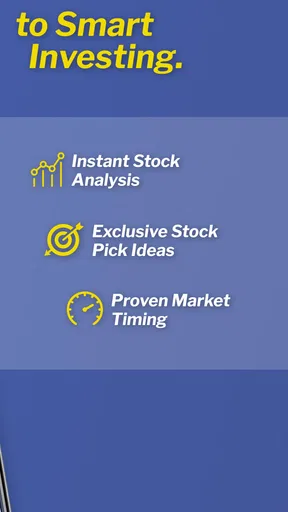
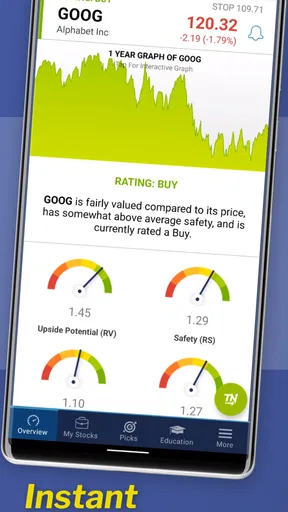
Now, if you're a data geek like me, you'll appreciate the detailed analysis that VectorVest provides. Each stock comes with a wealth of information, from fundamental data to technical analysis. This is where the app shines. It offers "Value," "Safety," and "Timing" ratings for each stock, which are designed to help you assess whether a stock is worth buying, holding, or selling. The ratings are straightforward and easy to understand, even if you're not a seasoned investor.
The best way to use those three readings, in my view, is as separate prompts rather than a single verdict. A stock that looks attractive on value does not automatically suit someone who cannot tolerate much volatility. A timing signal can change while the underlying reason you researched a company remains the same. Looking at the labels individually helps prevent the common mistake of treating one favorable score as a complete investment case.
Try comparing two companies in the same line of business instead of judging a number in isolation. Ask whether the ratings reinforce your existing view or challenge it, then investigate the reason for the difference using information you trust. This is a useful second-pass workflow: the app helps you narrow the question, while your own research supplies the context. It is especially helpful when a familiar company has become a habit in your portfolio and you want to reassess it with fresh eyes.
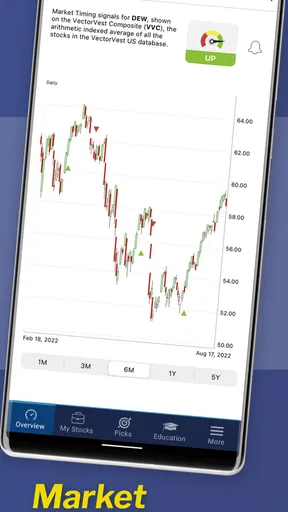
The app also includes a unique "Market Timing" feature. This is pretty cool because it analyzes the market's overall condition to suggest whether it's a good time to invest. It's like having a weather forecast for your investments, saving you from getting caught in a financial storm.
I would use that market-level view as background, not as an instruction to move an entire portfolio in or out at once. A broad signal can help explain why many stocks are behaving similarly, but it does not tell you whether a particular company fits your circumstances. If a market reading makes you uneasy, a sensible response might be to review your plan and exposure rather than make a rushed trade. That distinction is one of the most important habits a new investor can build.
Learning on the Go
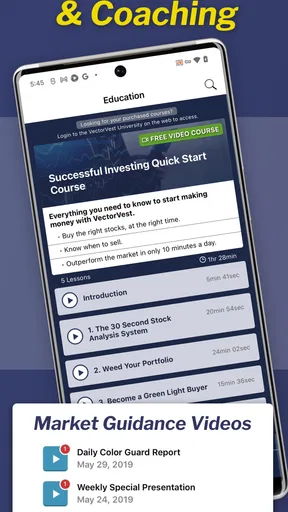
What's a great app without some educational content, right? VectorVest doesn’t just throw raw data at you; it also offers tutorials and guides to better understand the market. The "Stock Market University" feature is a treasure trove for anyone looking to sharpen their investing skills. Whether you're a newbie or a seasoned trader, there's something here for everyone.
For someone new, I would pair a tutorial with one real question rather than trying to absorb everything in one sitting. For example, if a term in a stock analysis is unfamiliar, learn that concept and then return to the company page to see how it changes your interpretation. This makes the learning practical and exposes misunderstandings early. It is also a useful way to tell whether the app’s analytical language feels clear enough for you to use consistently.
And let's not forget about the "Daily Color Guard" report. This daily briefing keeps you updated on market conditions and potential investment opportunities. It's like having a morning coffee chat with your financial advisor, setting you up for a productive day in the market.
A briefing is most useful when you give it a defined role. I would read it to understand the day’s broad context, then choose whether any item deserves a closer look later. That prevents a daily report from becoming a list of impulses. If you are investing for the long term, the report can be a checkpoint, but it need not dictate what you do every morning.
Customizing Your Experience
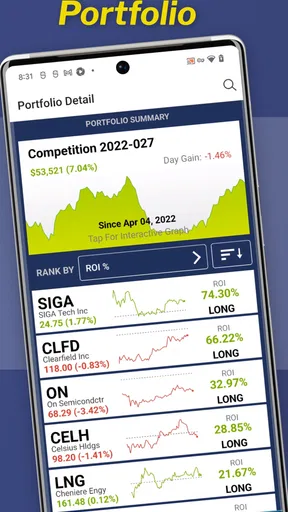
One of the things I love about VectorVest is its customizability. You can tailor the app to focus on the stocks and indices that matter most to you. Set up watchlists, track your portfolio, and even receive alerts for any price changes or news updates. It's all about keeping you informed without overwhelming you with unnecessary information.
The alert feature is particularly handy. You can set custom alerts for specific stocks or market conditions, ensuring you never miss a beat. This proactive approach can make all the difference in a fast-paced market environment.
There is a trade-off, though: alerts are only helpful if they correspond to a decision you have already thought through. Before creating one, decide what you will do when it arrives. Perhaps you will review a stock’s analysis, compare it with another candidate, or simply note a price move without trading. If you cannot name a sensible next step, the alert may add noise rather than useful discipline.
Making the first session count
A straightforward first success is not necessarily making a trade. It can be understanding one stock well enough to explain why it is on your watchlist, what the Value, Safety, and Timing readings suggest, and what further question you need to answer. That is a concrete outcome you can reach without treating the app as a prediction machine.
For instance, imagine you already own shares in a company and notice that the market feels unsettled. You could check the market view, review the company’s ratings, and compare the current picture with the reasons you bought it. If nothing has changed in your own plan, you may decide simply to keep watching. If something does need attention, you can research it calmly rather than reacting to a headline or a single daily move. The value is in making the review more deliberate, not in forcing an action.
One non-obvious benefit of keeping a short note outside the app is that it lets you compare your reasoning over time. Write down why you added a stock, what would make you reconsider it, and which part of the analysis you found persuasive. Later, you can distinguish a change in the company or market from a change in your own mood. This is especially useful when a price swing tempts you to revise your plan without new evidence.
Where the learning curve and costs show up
So, what’s the catch? As with any app, there are a few things to keep in mind. While VectorVest offers a lot of features, some of them come with a price tag. The app does offer a free trial, but to unlock its full potential, you might need to consider one of their subscription plans. It’s worth weighing the cost against the benefits, especially if you’re serious about investing.
The app is free to download, but in-app purchases range from $4.99 to $399.99 per item. I would check what access a particular purchase provides and whether it supports a routine you will actually maintain before paying. A large menu of analysis is not automatically worth the expense if you only check a few stocks occasionally. Someone who already has research tools through a broker or another service should compare the overlap first, rather than paying twice for similar work.
Moreover, while the app is packed with features, it might initially feel a bit overwhelming to beginners. But don't worry, once you get the hang of it, navigating through the app becomes second nature.
The friction for a newcomer is not just the number of screens; it is learning how to interpret a framework without handing over responsibility. If you are still learning basic ideas such as diversification, time horizon, and risk, make those concepts your first priority. The ratings can help structure a review, but they cannot tell you whether you need emergency savings, whether a concentrated holding is appropriate, or how much loss you can live with.
Who will get the most from it
I think this is best suited to a self-directed investor who enjoys researching individual companies and wants a repeatable way to check both stock-level readings and general market conditions. It can also suit a busy person who prefers a prepared dashboard and briefing to piecing together scattered screens. The tutorials may help a learner who is willing to take time with the terminology and treat each rating as a starting point.
I would skip it if you want a hands-off managed portfolio, a simple place to execute trades, or a one-click answer about what to buy. It is also a poor fit if detailed stock analysis makes you more anxious or encourages you to check prices constantly. In those situations, a broker’s basic account tools, a diversified investment approach, or a simpler portfolio tracker may serve you better. The right choice depends less on the number of features than on whether they support calm, consistent decisions.
VectorVest is suitable for a general audience, with an Everyone age rating, and its current version is 1.33.64255. It has been available since August 4, 2017, so this is an established mobile product rather than a newly launched experiment. Those details may help with basic expectations, but the more important question is whether its research style matches the way you invest.
Deciding whether it belongs in your routine
In conclusion, VectorVest Stock Advisory is a robust app that empowers you to make informed investment decisions. Whether you're just starting your investment journey or you're a seasoned pro, this app offers valuable insights that can enhance your trading strategy. Its combination of user-friendly design, detailed analysis, and educational resources makes it a standout choice in the crowded world of stock market apps.
My recommendation is to begin with a small watchlist, use the market overview for context, and learn the three stock ratings before deciding whether any paid access is worthwhile. Give the app a role in your research process, but keep your own written investment reasons and risk limits in view. That makes it easier to tell whether its structure is genuinely helping you or simply giving you more to monitor.
So, if you're ready to take control of your financial future, why not give VectorVest a try? You might just find it to be the missing piece in your investment puzzle.
Verdict
Strengths of VectorVest Stock Advisory
- Comprehensive stock analysis tools.
- User-friendly interface for beginners.
- Real-time market updates.
- Customizable stock alerts.
- In-depth educational resources.
Limitations of VectorVest Stock Advisory
- Monthly subscription required.
- Limited features in free version.
- Can be overwhelming for new users.
- No cryptocurrency tracking.
- Requires internet for full functionality.
Similar Picks in This Category
View All
Google Wallet
Google LLC4.3

Airtel: Recharge, Bank & Loans
Airtel4.0

PayPal - Pay, Send, Save
PayPal Mobile4.2

DANA Indonesia Digital Wallet
PT Espay Debit Indonesia Koe4.5

Binance: Buy Bitcoin & Crypto
Binance Inc.4.8

Cash App
Block, Inc.4.7
Frequently Asked Questions
What is VectorVest Stock Advisory and how does it work?
VectorVest Stock Advisory is a comprehensive investment app designed to help users make informed stock market decisions. It provides real-time data, stock analysis, and market forecasts. By utilizing its proprietary algorithms, the app evaluates stocks based on value, safety, and timing, giving users a clear buy, sell, or hold recommendation.
Is VectorVest Stock Advisory suitable for beginners?
Yes, VectorVest Stock Advisory is suitable for both beginners and experienced investors. The app offers educational resources and easy-to-understand analysis, making it accessible to those new to investing. Additionally, it provides in-depth insights and advanced tools for seasoned investors looking to refine their strategies.
What features does VectorVest Stock Advisory offer?
VectorVest Stock Advisory offers a range of features including real-time stock data, detailed stock analysis, market timing signals, and portfolio management tools. It also provides personalized alerts, educational webinars, and a comprehensive stock ranking system to help users make better investment decisions.
How reliable are the stock recommendations provided by VectorVest?
VectorVest is renowned for its robust analytical approach, using proprietary algorithms to assess stocks. While no system can guarantee success, VectorVest’s recommendations are based on extensive data analysis. Users should consider these insights as part of a broader investment strategy, along with their own research and risk assessments.
Is there a cost associated with using VectorVest Stock Advisory?
VectorVest Stock Advisory typically requires a subscription, with various plans available to suit different needs. While the app may offer a free trial, ongoing access to its full suite of features usually involves a monthly or annual fee. It's advisable to visit their official website for the most current pricing details.
